
Most motion capture systems assume a computer in the room. That assumption bites hardest in free-living gait studies. That assumption holds in a gait lab and breaks everywhere else: on a pitch, in a corridor, on a factory floor, in a patient’s home. QSense supports IMU recording without a laptop in two different ways, alongside conventional live streaming.
The question that decides whether a system fits is rarely how accurate it is. It is what has to be present while you record, and for how long. You can stream live to a host device over a wireless BLE dongle, record centrally on the body-worn FieldSync HUB, or record to memory inside each sensor and download afterwards. All three use the same sensors, the same application and the same output formats – you are choosing a recording method, not a different product.
On this page
Three ways to record IMU data
1. Live streaming to a host
Gives you: immediate data. Check sensor placement before a trial, give real-time feedback, or drive a VR or biofeedback application from live quaternions. Up to 18 sensors across two dongles, synchronized within 60 µs, with 7.5 ms latency at the sensor.
Costs you: the host device has to stay in wireless BLE range for the whole recording. Step out of range and the recording stops.
Use it when: you need to see the data while it is happening, or the recording stays inside one room.
2. Central recording on the FieldSync HUB
Gives you: long-duration IMU recording and independence. All sensors in a single time-aligned file, nothing near the subject, and up to five days of recording on the HUB’s own charge. Download over the docking station at up to 20 MB/s.
Costs you: full-rate live feedback. You work at the HUB’s recording modes rather than the sensors’ maximum rates, and the HUB tops out at ten measurement points rather than 18.
Use it when: the measurement is long, continuous, or somewhere a laptop cannot follow – a working shift, a training session, a patient at home.
3. On-sensor memory
Gives you: the highest sampling rates with nothing attached. Up to 800 Hz, with every sensor in a group recording at the same time and downloading afterwards from the QSense application.
Costs you: recording length. At 50 Hz you have 128 minutes; at 800 Hz you have 8. You download per sensor rather than getting one combined file.
Use it when: you need short high-rate trials away from any host – sprint or jump analysis, impact work, instrumented field tests.
Which IMU recording mode fits your measurement
| Live streaming | FieldSync HUB | On-sensor memory | |
|---|---|---|---|
| Max sensors | 18 (two dongles) | 10 (9 IMUs + the HUB) | All sensors in the group |
| Sampling rate | 1–800 Hz, depending on sensor count | 50 Hz raw 9DOF, 100 Hz raw 6DOF | 1–800 Hz |
| Recording length | Unlimited while in range | Up to 5 days on the HUB; sensors over 12 hours | 8–128 min, by rate |
| Must be present | Host device + BLE dongle | Nothing | Nothing |
| Live view | Yes, full rate | Reduced-rate monitoring | No |
| Data available | Immediately | After docking, up to 20 MB/s | After download |
| Output | One synchronized stream | One synchronized file | One file per sensor |
How long can a QSense sensor record on its own?
On-sensor IMU recording length depends on the sampling rate you configure. Higher rates fill the sensor’s memory faster.
| Sampling rate | Transmission rate | Recording duration |
|---|---|---|
| 50 Hz | 5 Hz | 128 min |
| 100 Hz | 10 Hz | 64 min |
| 200 Hz | 20 Hz | 32 min |
| 400 Hz | 40 Hz | 16 min |
| 800 Hz | 80 Hz | 8 min |
All three IMU recording modes, one application
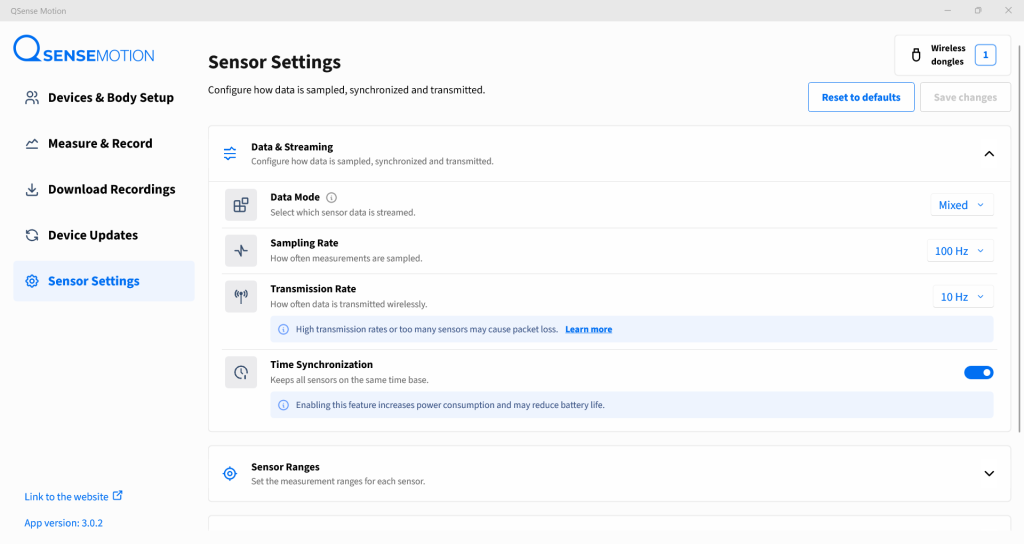
The FieldSync HUB is now fully integrated into the QSense software. Centralised recording, sensor configuration, download and export run from the same interface as live streaming, so there is no separate HUB tool to learn and no second place to manage sensors.
- Create a sensor group once and reuse it. Group setup has been simplified, so a configuration is defined, saved and recalled rather than rebuilt each session.
- Choose the recording mode — stream, HUB or on-sensor — for that measurement.
- Start and stop recording, with live status and a packet-loss indicator where streaming applies.
- Download and export. Raw IMU data and quaternions in open formats, readable without QSense software.


The interface has been rebuilt around this flow, so a non-technical user can go from unboxing to a synchronized recording in minutes. Devices are firmware-upgradable, so sensors and HUBs already in the field gain new capability rather than needing replacement. Every change in this release is listed in the firmware release notes.
Built into a product: ORYX GO
ORYX Movement Solutions built their ORYX GO system around the FieldSync HUB. It assesses lower-limb movement quality using eight body-worn sensors on elastic straps, worn over clothing, and it measures where the movement actually happens — walking and running on the field rather than in a gait lab. An objective analysis is available within 15 minutes of the session.


We integrated the HUB docking station directly onto the back of an Android and iOS tablet, so the whole workflow runs on one handheld device. The operator fits the sensors, records, docks the HUB, and the raw data uploads to the cloud for analysis. No laptop in the session, no cable to a host, no files to manage.
This is what centralised recording makes possible at product level. Streaming would have put a computer in every session and made it part of the product. Recording on the HUB removed it — which is what allowed ORYX to ship a system that travels in a shoulder case to a pitch. Their eight sensors also sit inside the HUB’s capacity with one channel to spare, which is the kind of headroom an OEM design needs. IMU recording without a laptop is the capability the entire product rests on. See ORYX GO.
Research: stroke rehabilitation at home
Home-based recording is not only a product question. In the Towards@HomeRehab project at Erasmus MC, 2M Engineering worked with the Department of Rehabilitation Medicine, Lode Holding, TU Delft Industrial Design and Cognitive Robotics, and Erasmus University on measuring upper-limb arm activity in stroke patients at home rather than in a clinic.
The problem is the same one this page describes. Upper-limb impairment after stroke limits daily activity, and conventional assessment requires a clinic visit that is costly, infrequent and unrepresentative of how the arm is actually used. Measuring activities of daily living means measuring where they happen, which rules out anything needing a technician and a computer in the room. The project ran from August 2022 to October 2026, funded by Erasmus MC TKI-LSH with support from Rijndam Rehabilitation, and produced a doctoral thesis on validating IMU-based upper-extremity kinematics for home use.
Towards@HomeRehab, Erasmus MC Rehabilitation Medicine · From clinic to living room: wearable sensors for home-based upper extremity stroke rehabilitation
What if I only need one measurement point?
If you need long, high-rate logging from a single location and no wireless at all, the HP215 standalone 9DOF data logger is the better fit. It is built for deep signal analysis and algorithm development rather than multi-sensor synchronized capture. The three IMU recording modes on this page are about capturing across a group of sensors; the HP215 is about one sensor recording for a very long time.
Not sure which mode fits?
IMU recording without a laptop changes what you can measure, but only if the mode suits the study. Tell us what you are measuring, how many sensors you need, how long each recording runs and what has to be in the room. We will tell you which recording mode fits — and if none of them does, we will say so.
Related: QSense 9DOF IMU sensor · wireless BLE dongle · frequently asked questions



 English
 Spanish
 German
 French
 Dutch